Oversampling in Mastering: What It Is, Why It Matters, and How to Use It Properly
Mastering oversampling explained clearly. Learn how oversampling prevents aliasing, controls true‑peak distortion, and improves limiter transparency in professional audio mastering. A practical, technical guide for mixers, producers, and mastering engineers.
Andy De Rosa (Founding Member/Senior Mastering Engineer)
6/17/20264 min read


Oversampling is one of those terms that gets thrown around in audio post‑production, usually with a vague “it makes things cleaner” attached to it. In mastering, though, oversampling isn’t optional - it’s a technical safeguard that protects your audio from distortion, aliasing, and unexpected true‑peak overs when your music hits streaming platforms.
This guide breaks down oversampling in a way that’s practical, accurate, and directly relevant to real‑world mastering workflows.
What Oversampling Actually Does
Oversampling increases the internal sample rate of a plugin — sometimes 2×, 4×, 8×, or even 16× or 32x - so the processor can work with a much finer time resolution.
That higher resolution gives the limiter (or any nonlinear processor) more information about fast transients and steep waveforms, which means:
Cleaner limiting decisions
Less aliasing
More accurate true‑peak control
Fewer surprises when the file is encoded to AAC/MP3/OGG
Why Oversampling Matters Specifically in Mastering
Mastering is the final stage before distribution. That means any distortion, aliasing, or true‑peak overs that slip through here will be baked into every version of the track forever.
What does "Nonlinear" mean? Explain it to me
Nonlinear processing is basically any tool that adds flavor rather than just turning something up or down. A linear process behaves like a volume knob: clean, predictable, nothing extra added. A nonlinear process behaves more like a guitar pedal or an analogue circuit: it adds colour, harmonics, grit, warmth, or punch depending on how hard you drive it. That’s why things like saturation, clipping, limiting, and certain compressors fall into this category. They reshape the sound instead of simply adjusting it, which is why they can also create unwanted artefacts like aliasing if they’re not handled carefully.
Oversampling protects you from three major problems:
1. Aliasing from Nonlinear Processing
Limiters, saturators, clippers, and even some EQs generate harmonics. At normal sample rates (44.1–96 kHz), some of those harmonics fold back into the audible range as aliasing.
Oversampling pushes those harmonics far above the audible band so they can be filtered out cleanly.
2. True‑Peak Overs That Aren’t Visible at the Project Sample Rate
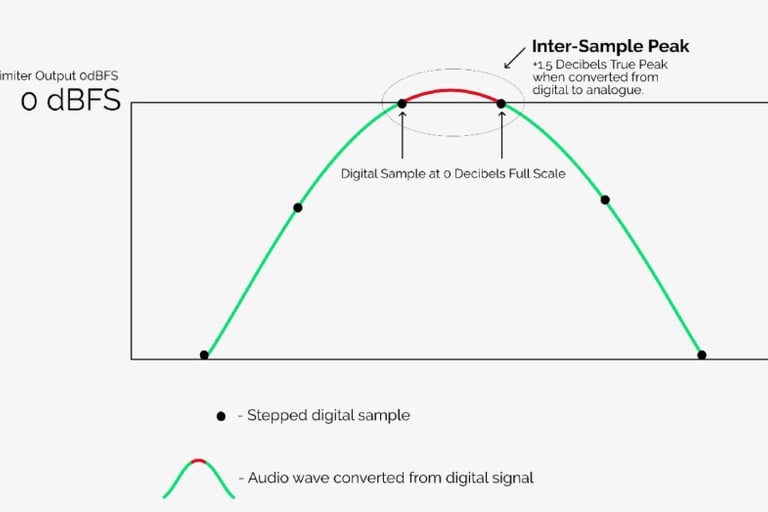
A limiter working at 44.1 kHz can miss inter‑sample peaks — the peaks that occur between samples during reconstruction.
Oversampling lets the limiter “see” those peaks and control them accurately.
3. Codec Distortion on Streaming Platforms
Lossy encoders (AAC, MP3, OGG) can introduce overs and distortion if the source file is already close to the ceiling.
Oversampling helps ensure the limiter is catching the peaks before the codec makes them worse.
How Oversampling Works Inside a Limiter
Here’s the simplified signal flow:
Upsampling - The audio is resampled to a higher rate (e.g., 8×).
Processing - The limiter analyses and shapes peaks with far more precision.
Filtering - Ultrasonic content is removed to prevent fold‑back.
Downsampling - The signal is returned to the project sample rate.
This entire process happens inside the plugin — your DAW doesn’t need to run at the higher rate.
When You Should Use Oversampling in Mastering
Oversampling is essential when using:
Limiters
Clippers
Saturators
Nonlinear EQs
Dynamics processors with lookahead
If you’re doing any final‑stage peak control, oversampling should be on.
How Much Oversampling Should You Use?
Here’s the practical, real‑world answer:
2× or 4× - Good for most mastering limiters
8× - Ideal for transparent, high‑end limiting
16× or 32x - Only if the plugin is extremely efficient or you’re doing heavy clipping
Off - Only for linear processes (gain, pan, mid/side routing, etc.)
More oversampling = cleaner results, but also more CPU load. In mastering, the CPU cost is usually worth it.
Oversampling and True‑Peak Limiting
Oversampling is not the same as true‑peak limiting, but it’s required for true‑peak limiting to work properly.
A limiter can’t catch inter‑sample peaks unless it’s oversampling internally.
If you enable “True Peak” in a limiter that doesn’t oversample, you’re not actually getting true‑peak protection, you’re just getting a label.
Oversampling in a Full Mastering Chain
Here’s how oversampling fits into a typical mastering workflow:
Surgical EQ - No oversampling needed
Tone‑shaping EQ - Optional
Compression - Optional
Saturation / harmonic enhancement - Oversampling recommended
Clipping - Oversampling essential
Limiting - Oversampling essential
Metering - No oversampling needed
The closer you get to the output ceiling, the more oversampling matters.
Common Misunderstandings (Let’s Clear These Up)
“Oversampling makes things sound brighter.”
No - if you hear a tonal change, it’s usually because the plugin’s anti‑aliasing filter is doing its job.
“You only need oversampling at 44.1 kHz.”
Even at 96 kHz, nonlinear processors can alias. Oversampling still helps.
“Oversampling is only for limiters.”
Anything nonlinear benefits from it.
“Oversampling always sounds better.”
Not always — some plugins implement it poorly. Trust your ears and your meters.
Final Takeaway
Oversampling is one of the most important, and most misunderstood tools in modern mastering. It gives your limiter the resolution it needs to make clean, accurate decisions, protects your audio from aliasing, and ensures your masters survive the brutal reality of streaming codecs.
If you’re aiming for professional, reliable, distribution‑ready masters, oversampling isn’t a luxury. It’s part of the job.
If all this jargon has left you uneasy, reach out to us. Let Mastering Alliance™ professional mastering engineers work on your music project. We're here to shelter you from the technicalities and to make your music sound awesome. Get in touch at contact@masteringalliance.com!
Contact Us
Email:
© 2026 Mastering Alliance™